Klaviyo SMS Product Feeds and RCS Carousels: Ecommerce Guide 2026
By Atlas Media Group
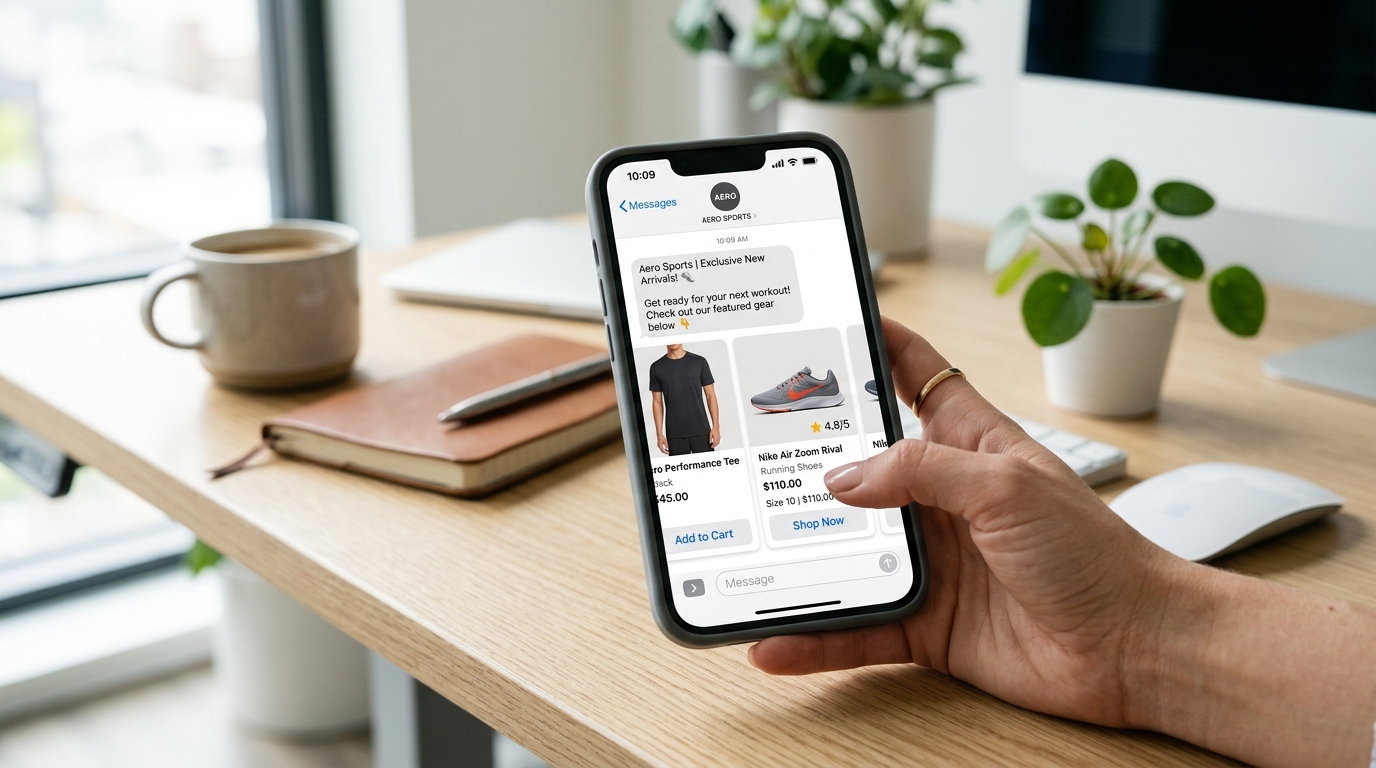
Klaviyo SMS product feeds with RCS carousels let ecommerce brands send swipeable, image-rich product recommendations directly inside a subscriber's native messaging app — no link to click, no app to download. Launched in mid-2026, the feature brings email-level visual merchandising to SMS for the first time. SMS marketing already achieves 98% open rates versus 20–30% for email (Klaviyo, 2026). Adding product carousels that show actual product images, names, and pricing transforms a text notification into an interactive shopping experience. Very few brands have activated this before BFCM — which is exactly why it matters.
In this guide
- What Are Klaviyo SMS Product Feeds (and What's RCS)?
- Why RCS Carousels Are a BFCM Game-Changer for SMS Marketing
- How to Set Up Product Feeds in Klaviyo SMS: Step-by-Step
- Best SMS Flows to Add Product Feed Carousels To
- Personalization and Segmentation: Sending the Right Products to the Right Subscribers
- FAQ: Klaviyo SMS Product Feeds and RCS
Key Takeaways
- Klaviyo SMS product feeds deliver swipeable product carousels inside SMS/RCS messages — no third-party app required on supported devices.
- RCS messages see 3–5× higher engagement than standard SMS (Google, 2025); brands activating before BFCM gain a first-mover edge.
- The highest-ROI flows for product carousels are browse abandonment, abandoned cart, post-purchase cross-sell, and back-in-stock.
- Klaviyo falls back to standard SMS automatically for subscribers whose devices don't support RCS — no list management changes needed.
- Personalization via browsing data and segment membership is what separates high-performing product feed SMS from a generic blast.
What Are Klaviyo SMS Product Feeds (and What's RCS)?
Before diving into setup, it's worth being precise about what we're actually talking about — because "SMS product feeds" and "RCS" are two related but distinct concepts that Klaviyo combines into a single feature set.
SMS product feeds are dynamic content blocks that pull live product data — images, titles, prices, inventory status, and direct URLs — from your connected product catalog into an SMS or RCS message at send time. Instead of writing a static message that mentions a product by name, the message assembles itself around real catalog data. The product image your subscriber sees is the actual product photo from your Shopify store, the price is the current live price, and the link goes directly to that product's page.
RCS (Rich Communication Services) is the messaging protocol that makes the visual carousel experience possible inside a native messaging app. Think of it as the successor to SMS — same phone number-based delivery, but with support for high-resolution images, swipeable carousels, branded sender names, read receipts, and interactive tap-to-action buttons. On Android, RCS runs inside Google Messages. On iOS 18 and later, Apple added full RCS support, meaning iPhone users can now receive RCS carousels without any workaround.
Together, Klaviyo SMS product feeds with RCS delivery create something that previously only existed in email: a branded, visual product experience sent directly to a subscriber's messaging inbox, with near-universal open rates and no inbox competition from hundreds of other emails.
| Feature | Standard SMS | Klaviyo SMS + RCS with Product Feed |
|---|---|---|
| Message format | Plain text only | Text + product images + pricing |
| Product display | Mentioned by name/link only | Swipeable visual carousel |
| Engagement rate vs SMS | Baseline | 3–5× higher (Google, 2025) |
| Branded sender ID | Short code or number | Branded business name + logo |
| Fallback for unsupported devices | N/A | Automatic SMS fallback |
| Setup required | None (existing flow) | Catalog connection + RCS enablement |
Why RCS Carousels Are a BFCM Game-Changer for SMS Marketing
BFCM is the most competitive send window of the year. Every brand is in your subscriber's inbox, their social feed, and their email at the same time. The brands that break through are the ones whose messages look and feel different — and that's exactly what RCS product carousels do inside a channel most brands are still using as a plain-text blast.
The numbers matter here. RCS messages see 3–5× higher engagement than standard SMS (Google, 2025). That's not a marginal improvement — it's the difference between a flow that recovers 8% of abandoned carts and one that recovers 30–40%. During BFCM, when your SMS abandonment and browse volumes spike significantly, that multiplier compounds fast.
There's also a first-mover advantage that won't last forever. Because Klaviyo SMS product feeds launched mid-2026, the majority of ecommerce brands heading into BFCM 2026 haven't activated them yet. The window to be the only brand in your subscriber's messages with a swipeable product carousel is short — it closes as adoption spreads after the holiday season.
From a competitive standpoint, this is the kind of edge that's worth the setup time. The brands we've seen activate RCS early in other markets report that SMS becomes one of their top two revenue channels during BFCM — not third or fourth behind email and paid ads. That shift happens when SMS stops being a notification channel and starts being a purchase channel.
How to Set Up Product Feeds in Klaviyo SMS: Step-by-Step
The setup process has two parts: connecting your product catalog and enabling RCS in your SMS flows. Both are done inside Klaviyo's dashboard, and neither requires developer work if you're running Shopify with the standard Klaviyo integration.
Step 1: Verify Your Product Catalog Sync
Klaviyo pulls product data from your connected ecommerce integration. For Shopify brands, this is the Klaviyo-Shopify integration — if you're already sending abandoned cart emails with product blocks, your catalog is almost certainly connected. Navigate to Integrations > Shopify in your Klaviyo account and confirm the catalog sync status shows active and recently updated. If your catalog hasn't synced in more than 24 hours, trigger a manual sync before building any product feed SMS.
Step 2: Enable RCS in Your Account Settings
RCS availability in Klaviyo is being rolled out progressively as of mid-2026. Go to Settings > SMS > Channels and look for the RCS toggle. If it's available, enable it for your sending profile. If you don't see it yet, contact your Klaviyo account manager or customer success contact — accounts with active SMS programs are typically prioritized for early access. Note that RCS requires a registered business sender profile, which Klaviyo handles on your behalf during activation.
Step 3: Build a Product Feed Block in the SMS Editor
Inside any SMS flow step, open the message editor and look for the Product Feed content block — it appears alongside the standard text block in the content panel. Add the block and configure the product source: you can pull from the catalog globally (e.g., top sellers, new arrivals), or filter by collection, tag, or category. For flows like abandoned cart and browse abandonment, you'll want to enable personalized product matching, which pulls the specific products the subscriber viewed or added to cart rather than a generic catalog selection.
Step 4: Configure Carousel Layout and Fallback
Set the carousel to display 3–5 products — enough to give variety without overwhelming. Each carousel card shows: product image, product name, price, and a tap-to-shop button. For the SMS fallback (sent to subscribers on non-RCS-capable devices), configure a concise plain-text message with a link to the same products. Klaviyo handles the routing automatically — you configure both versions once and the system selects the right delivery format per subscriber.
Step 5: Test Before Going Live
Send a test to an Android device running Google Messages and an iPhone running iOS 18+ to verify the carousel renders correctly on both. Check that product images load cleanly, prices are current, and tap-to-shop buttons resolve to the correct product pages. Also send the fallback SMS test to confirm the plain-text version looks right. One common issue: images that work in email can be too large or in the wrong aspect ratio for RCS carousels — Klaviyo recommends square (1:1) or 4:3 ratio product images at minimum 800px wide.
Best SMS Flows to Add Product Feed Carousels To
Not every SMS flow benefits equally from product carousels. The highest-ROI applications are flows where product context is already the point of the message — where showing the product visually rather than just naming it removes the last friction between the message and the purchase.
Browse abandonment is the single highest-impact application. A subscriber who viewed a product page but didn't add to cart is already interested — they just need a nudge. A carousel showing the exact product they viewed (plus 1–2 related items) converts significantly better than a text message saying "You left something behind." The visual confirmation that you know exactly what they were looking at creates a personalized, relevant experience rather than a generic prompt.
Abandoned cart flows are the second priority. Abandoned cart SMS already converts well — product carousels push it further by making the message feel like a personalized shopping assistant rather than an automated reminder. Show the exact cart items with current prices and a direct "Complete your purchase" CTA button.
Post-purchase cross-sell flows are excellent for product carousels because the subscriber has already proven purchase intent. A carousel of products complementary to what they just bought — sent 3–7 days after delivery — drives repeat purchases at a moment when customer satisfaction is typically high.
Back-in-stock alerts are high-intent by nature — the subscriber opted in specifically because they wanted a specific product. A single-product carousel with the product image, current price, and an "Shop Now" button drives immediate action. These flows tend to have the highest conversion rates of any SMS because the message arrives at peak intent.
BFCM promotional SMS are where carousels shine for broadcast sends. Instead of a generic "Our sale is live" message, a carousel showing 4–5 of your best BFCM deals with images and prices gives subscribers a reason to engage beyond just clicking a link.
Personalization and Segmentation: Sending the Right Products to the Right Subscribers
A product carousel SMS that shows the wrong products is still just a blast. The real competitive advantage from Klaviyo SMS product feeds comes from combining the visual format with the personalization data Klaviyo already has on your subscribers.
Klaviyo tracks browsing behavior, purchase history, and product category affinity for every profile synced through your Shopify integration. When building a product feed SMS, you have three levels of personalization to choose from:
- Behavior-based personalization: Show the specific products the subscriber viewed or added to cart. This is the default for browse abandonment and abandoned cart flows and requires no additional setup beyond enabling the personalized product matching option in the feed block.
- Category-based personalization: Filter the product feed by category based on the subscriber's purchase history. A subscriber who has only ever bought from your skincare collection sees skincare products; a subscriber who buys apparel sees apparel. This is particularly effective for post-purchase cross-sell and BFCM broadcast flows.
- Segment-based product feeds: Build separate flow branches for defined segments — VIP customers, first-time purchasers, win-back targets — with different product selections and messaging for each. A VIP customer carousel during BFCM can surface exclusive or early-access products; a win-back carousel can lead with your best-sellers or highest-reviewed items.
Our team at Atlas manages Klaviyo accounts where the SMS and email retention programs are the primary revenue drivers outside of paid acquisition. The brands running personalized product feed carousels with proper segmentation are seeing SMS outperform email in revenue-per-subscriber during high-intent windows like abandoned cart and back-in-stock — not just in open rates.
One critical note on list health: product feed carousels only perform well if your SMS list is clean and your subscribers are engaged. Before BFCM, run a suppression pass on subscribers who haven't clicked or responded in 90+ days. Sending to a bloated, disengaged list inflates send costs without returns and risks carrier filtering. A smaller, engaged list with a product carousel will outperform a large, cold list with any SMS format.
The Shopify integration quality also matters — if your product catalog data in Klaviyo is stale, out of stock, or has missing images, your carousels will reflect that. Before BFCM, audit your catalog sync and ensure that product images, prices, and inventory are accurate and up to date in both Shopify and Klaviyo.
For brands running full Klaviyo setups, this feature pairs naturally with Klaviyo Flows 2.0's rebuilt processing engine, which now handles over 74,000 profiles per second — meaning your browse abandonment and abandoned cart SMS messages can fire in near-real-time rather than in batches, which significantly improves conversion rates in time-sensitive windows.
FAQ: Klaviyo SMS Product Feeds and RCS
What are Klaviyo SMS product feeds?
Klaviyo SMS product feeds are a mid-2026 feature that lets brands pull live product data — images, names, prices, and links — directly into SMS and RCS messages. Instead of a text-only message with a link, subscribers receive a rich carousel of products they can swipe through inside their native messaging app. The feed connects to your product catalog (via Shopify or a custom integration) and can be personalized based on browsing history, purchase behavior, or segment membership, so each subscriber sees products relevant to them rather than a static promotional blast.
Do subscribers need a special app to see RCS carousels?
No special app is required. RCS is built into Android's native Messages app and into Apple's Messages app on iOS 18 and later. Subscribers on supported devices and carriers simply receive the rich carousel experience inside the messaging app they already use every day. For subscribers whose devices or carriers do not yet support RCS, Klaviyo automatically falls back to a standard SMS with a link, so your message always gets delivered. In practice, RCS coverage now reaches an estimated 75–85% of US smartphone users.
Which Klaviyo SMS flows benefit most from product feed carousels?
The highest-impact flows for product feed carousels are browse abandonment, abandoned cart, post-purchase cross-sell, and back-in-stock alerts. Browse abandonment and abandoned cart flows benefit because the subscriber has already signaled purchase intent — seeing the exact product they viewed, with its image and price, creates a strong contextual nudge. Post-purchase cross-sell flows work well with related product carousels that surface complementary items. Back-in-stock flows are highly effective as a single-product carousel that drives immediate action when urgency is high.
How much does Klaviyo SMS with RCS cost compared to regular SMS?
RCS messages consume more Klaviyo message credits per send than standard SMS due to the richer delivery format and carrier infrastructure. However, the 3–5× higher engagement rates typical of RCS often produce a lower cost per conversion despite the higher per-message cost. Brands should evaluate RCS not on a per-message cost basis but on revenue-per-recipient metrics across their flows. In most cases, the incremental cost of RCS is more than offset by improved click-through rates, especially in high-intent flows like abandoned cart and back-in-stock.
Is Klaviyo SMS product feeds available to all accounts?
Klaviyo SMS product feeds launched in mid-2026 and are being rolled out progressively across accounts. Higher-tier Klaviyo plans and accounts with active SMS programs typically receive access earlier. To check availability, navigate to your Klaviyo dashboard and look for the product feed option within the SMS content builder, or reach out to your Klaviyo customer success manager. Because this is a new feature, very few brands have activated it yet — giving early adopters a meaningful competitive advantage before BFCM.
If you're running Klaviyo for email and SMS and want to get product feed carousels live before BFCM — or if your SMS program needs a full rebuild before adding new features — our team sets up and manages Klaviyo retention systems for ecommerce brands. Talk to us about your Klaviyo setup.